11 Best Web Analytics Tools to Use in 2025 (Free & Paid)
Introduction
Choosing a web analytics tool in 2025 feels like walking into a crowded market where everyone shouts the same promise. You want clear data, fast dashboards, and product insights that help you ship better features. You also want pricing that does not punish growth. I have been in that same aisle with too many tabs open and a coffee that turned cold.
The good news is that you have excellent options. Some tools are great for simple traffic tracking, while others go deep on product analytics and behavioral flows. A few deliver data in real time. Others make you wait until tomorrow. In this guide, I will cut through the noise and show you the eleven best tools worth your attention this year.
How to evaluate web analytics tools in 2025
Before we jump into the list, frame your decision with a few practical questions. Ask how quickly you get data. Ask whether the product offers event based tracking that captures user behavior beyond page views. Check how pricing scales when you add more sites or more traffic. Consider privacy needs and data residency if you work in regulated spaces. Finally, look for integrations that fit your stack rather than forcing a migration for one report.
I also recommend testing with a real project for one week. Create a few custom events. Build a funnel. Invite a teammate. You will feel very quickly whether the tool respects your time or slows you down.
I once tried four tools in a week. My dev team almost quit.
1. PrettyInsights
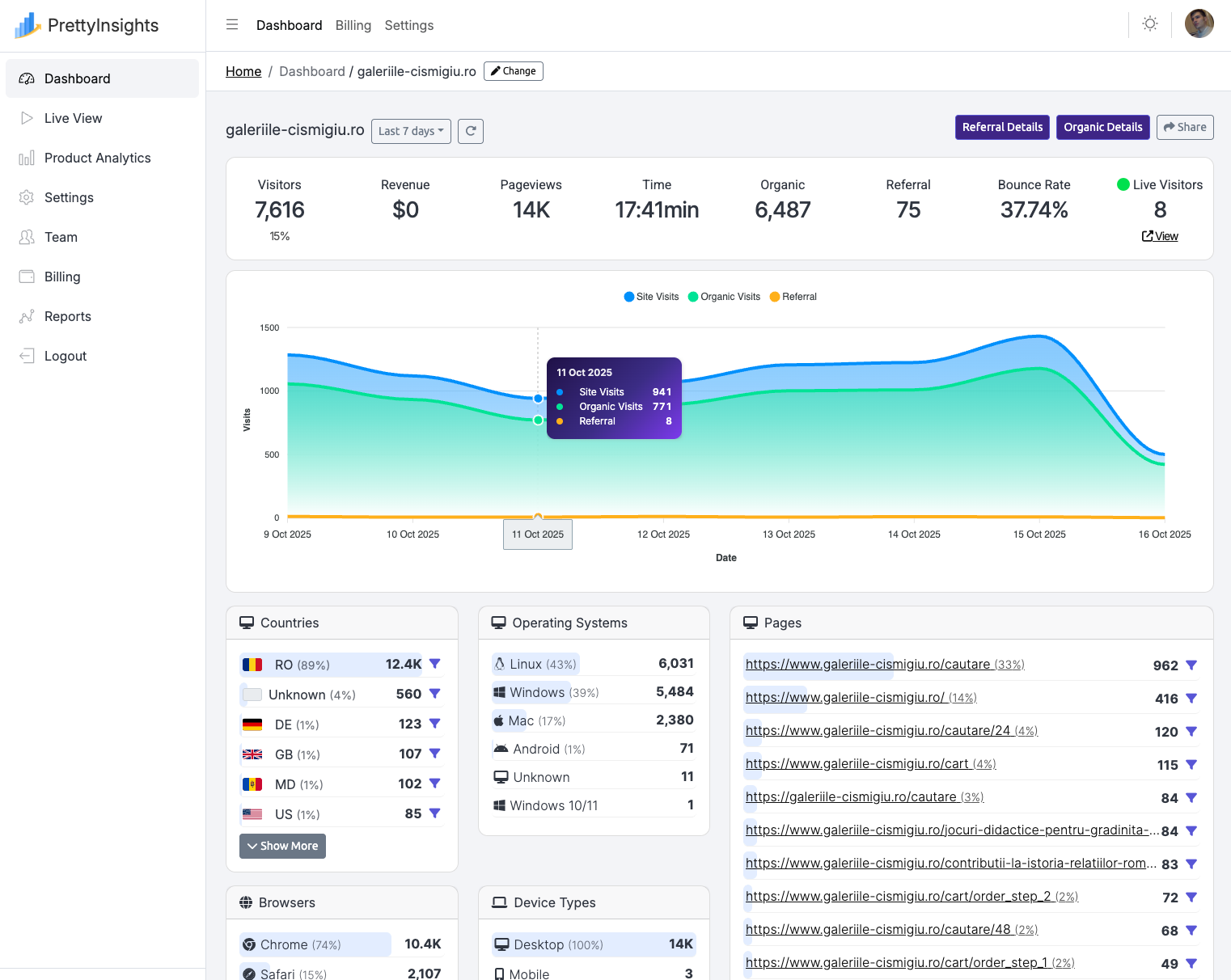
PrettyInsights leads this list because it balances web analytics and product analytics without turning your wallet into a cautionary tale. You get live data that updates as visitors arrive. That matters when you run paid campaigns, launch features, or debug a funnel at midnight. Waiting half a day to know if a change worked is not fun. PrettyInsights shows you the result now.
Product analytics means something
Product analytics is not an afterthought. You can track events, build funnels, and see where users drop off inside key journeys. That includes custom properties for things like plan, device type, or feature flags. If you manage multiple brands, PrettyInsights lets you monitor forty to fifty sites under the same account. It becomes a central cockpit for agencies and in house teams with many domains.
Pricing is refreshingly sensible. You pay for a clear plan that actually matches usage. You do not get upsold every time you want a basic feature like event history or a simple export. The API is there when you need to push or pull data into your own dashboards or marketing tools. I pulled events into a feature adoption view for a product meeting last month, and it took me minutes rather than hours.
Other tools like posthog or sentry can be also used here for product analytics.
How does it look vs GA4
Let us address the elephant in the room. GA4 often delays data by twelve to twenty four hours. That delay makes quick iteration a guessing game. PrettyInsights focuses on live data, so you can test landing pages during a campaign and react in time. Push a new headline at noon and know by the afternoon if it is actually working. My stress level says thank you.
Where PrettyInsights shines
-
Live reporting for traffic and events, ideal for campaign monitoring
-
Product analytics features that cover funnels, cohorts, and retention
-
Account structure designed for many sites under one roof
-
Affordable plans that do not punish growth
-
A clean interface that gets out of your way
2. Google Analytics 4
GA4 is the default for many teams because it is there and it integrates with the Google ad stack. It supports event based tracking and offers flexible reporting through explorations. The ecosystem around GA4 is massive. You will always find a tutorial, a community answer, or a consultant who can help.
The challenge remains data freshness. Standard reports often lag by twelve to twenty four hours, which slows iteration on campaigns and product changes. GA4 can be powerful if you invest in custom setups and BigQuery. That is also where complexity and hidden cost appear. If you are comfortable with the stack and love the ad integration, GA4 still has a place on your shortlist.
I keep GA4 around for historical comparisons and ad reporting. I do not rely on it for fast feedback anymore.
3. Matomo
Matomo offers serious control for teams that want to own data. You can self host it or use the cloud version. The product covers page analytics, events, funnels, and ecommerce tracking. Privacy features are strong and data residency options fit many compliance needs. This is a big reason many public sector projects and health related sites pick Matomo.
Self hosting introduces maintenance and scaling tasks. You will need a plan for updates and performance as traffic grows. The interface has improved over the years, although it can feel heavy if you only need a few reports. If data control is your priority, Matomo is a solid choice with a mature set of features.
4. Plausible
Plausible takes the minimalist path and does it well. You get clean reports, a fast dashboard, and simple event tracking without complex setup. Privacy friendly defaults make it a good fit for teams that want analytics without the bloat. I like Plausible for marketing sites, content networks, and projects that value speed and clarity.
The simplicity comes with a tradeoff. Product analytics features are intentionally limited. You can track events and goals, but you will not find deep funnels or advanced retention tooling. If you want a lightweight companion that shows traffic and conversions at a glance, Plausible is an easy win.
Short and sweet, like a dashboard that loads before your coffee cools.
5. Fathom
Fathom is another clean and privacy focused tool that keeps setup fast and reports readable. It works well across many sites and gives you real time views of traffic. The billing model is straightforward and predictable for agencies. You get a single script that is fast and plays nicely with performance budgets.
The product focuses on simple insights. You will not find a full product analytics lab with funnels and cohorts. That is not a flaw. It is a choice. Pick Fathom if you want to monitor traffic, pages, and basic goals with minimal overhead and strong privacy posture.
6. Clicky
Clicky gained a loyal audience by showing live visitors with detailed logs and uptime checks. The real time feel makes it great for monitoring launches and promotions. You can see what is happening right now and follow individual sessions with surprising depth. It is like watching your site breathe during a big moment.
The interface feels vintage in places, but the data is rich and immediate. This is a practical tool for site owners who want live feedback without waiting for batch processing. It pairs well with lightweight setups and small teams that value immediacy.
7. Mixpanel
Mixpanel focuses on product analytics. It excels at event tracking, funnels, retention analysis, and user level exploration. If you build apps or complex web products, Mixpanel helps you understand which features drive activation and long term value. The query interface is flexible once you learn the patterns, and the segmentation options are deep.
Costs can rise with high event volumes and many users. You should model expected usage before moving everything into the platform. If your team relies on product led growth and detailed behavior analysis, Mixpanel remains a top tier choice. I used it to redesign an onboarding flow and cut churn on week two. The reports told us where users vanished and why.
8. Amplitude
Amplitude is another leader in product analytics with strong capabilities for cohorts, journeys, and experiments. It is powerful for teams that run iterative feature work and want to connect actions to outcomes. The platform includes a strong governance layer for events, which helps large teams avoid chaos in naming and properties.
Like Mixpanel, Amplitude can be more than you need if you only want traffic counts and basic conversions. It shines in product teams where experiments run weekly and decisions need to link to behavior changes. When you need to answer deep questions about retention drivers, Amplitude answers them with confidence.
9. Heap
Heap captures events automatically and lets you define them retroactively. That approach reduces the upfront tagging burden during early stages. You can ship product changes and then define the events you realize you needed. For busy teams, this flow is a gift. The tool also offers strong funnels and user level analysis.
Automatic capture is not magic, and you still need good taxonomy and governance. Over time you will refine events and properties to keep reports clear. Heap is an excellent choice for companies that iterate quickly and want to keep the analytics workload low while they find product market fit.
10. Piwik PRO
Piwik PRO combines privacy first design with enterprise features. It supports on premise and private cloud deployments, which appeals to regulated industries and public organizations. You get a familiar analytics model with strong consent management and data residency options. The product integrates with SharePoint and popular tag managers, which helps in complex environments.
It is a serious platform. Expect an enterprise sales process and pricing that reflects that position. If your organization requires strict control and audit trails, Piwik PRO belongs on your shortlist alongside Matomo. I have seen it used successfully in government and healthcare projects where compliance is non negotiable.
11. Adobe Analytics
Adobe Analytics forms part of a larger marketing cloud. It is highly customizable and integrates with audience tools and testing platforms. Large enterprises with dedicated analytics teams can build very specific reporting that aligns to business language and custom dimensions. The data model is powerful and supports complex segmentation across channels.
The complexity is real. Setup, training, and ongoing care demand time and skilled people. If you already live in the Adobe ecosystem and need enterprise scale features, Adobe Analytics delivers. For smaller teams, this is often more tool than necessary. Choose it for very large programs with strict governance and a mature analytics practice.
Quick picks by use case
Sometimes you just need a nudge in the right direction. Here is a short cheat sheet to narrow the field.
-
Live data for campaigns and product launches
PrettyInsights or Clicky -
Simple site analytics with privacy focus
Plausible or Fathom -
Deep product analytics for apps and complex flows
Mixpanel or Amplitude or Heap -
Own the data and meet strict compliance
Matomo or Piwik PRO -
Ad stack integration and broad community
GA4 -
Enterprise marketing cloud alignment
Adobe Analytics
I know you love a quick list. We all do.
PrettyInsights vs GA4 in practice
Let us get specific. You launch a new pricing page today at noon. You push ads at one in the afternoon and change the hero copy at three. With GA4, standard reports may not reflect the final outcome until tomorrow morning. You can peek at some real time widgets, but exploratory analysis usually waits. That delay risks wasted ad spend and slow iteration.
With PrettyInsights, you watch events and conversions update in real time. You see the funnel after the copy change. You catch a spike in exit rate before the campaign burns the budget. The live loop supports tighter experiments during the same working day. You can make a second change by five. You can sleep better by eleven.
I have been on both sides. Live feedback wins when speed matters.
Pricing and value in 2025
Prices vary widely across this landscape. Some tools sell by event volume. Others by page views or sites. A few bundle many features and hide power behind higher tiers. The crucial question is how the price maps to your use. If you manage many domains, look for plans that allow multiple sites without punishing fees. If you run a single product with heavy usage, model your event volume and test the free tier limits.
PrettyInsights keeps a friendly entry point and supports many sites under one account. Plausible and Fathom offer predictable plans for content heavy projects. Mixpanel and Amplitude are worth the spend if product analytics drives your roadmap every week. GA4 is free at the surface, but advanced use often pushes you to BigQuery and custom work. Free is not always free after the fourth spreadsheet.
Implementation tips that save hours
Start with a clear event taxonomy. Define names, properties, and rules for every event you care about. Keep the names readable. Document ownership for changes. Use a tag manager where possible to avoid code deployments for simple tweaks. Create a test site or staging project for validation before sending data to production.
Build at least one funnel that matches your core goal. For ecommerce, that is usually add to cart to checkout to purchase. For SaaS, activation steps like invite sent or integration connected. Schedule a weekly review with a short agenda. Pull insights into the product backlog with owners and timelines. Data without action is just a screenshot in a slide deck.
A final tip. Turn off metrics that no one uses after one month.
Frequently asked questions
Do I need both web analytics and product analytics
For most teams, yes. Web analytics helps you understand acquisition, pages, and campaigns. Product analytics helps you understand feature adoption and retention. Many tools blend the two, which is why platforms like PrettyInsights stand out.
Is live data really that important
It depends on your workflow. If you run experiments and paid campaigns, live data changes how fast you can respond. If your work is monthly reporting, delay matters less.
What about privacy and consent
Pick a tool that supports consent by default, honors regional laws, and offers data residency if needed. Matomo, Piwik PRO, Plausible, and Fathom lean into this area. PrettyInsights also works well with compliance focused setups.
Conclusion
You have more choice than ever, which is both a blessing and a time trap. The right tool helps you move faster, focus on the right features, and spend money where it counts. In 2025, the best picks combine web analytics with product analytics and deliver data without delay. That combination lets growth and product teams speak the same language and act within the same day.
If you want a practical starting point, begin with PrettyInsights for live data and product features under one roof. Keep GA4 for historical ad reporting if you need it. Use Plausible or Fathom for simple sites that value privacy and speed. Bring in Mixpanel or Amplitude when you scale into advanced product questions. You can always evolve the stack as your needs change.
One final thought. Tools do not fix strategy. They only reveal whether the strategy works. Choose a tool that tells the truth fast and gets out of your way.
Now go ship something great, and may your bounce rate behave.